

Senior PC Setup & Hardening
The “Grandparent Scam” Ends Here:
How to Harden a Senior’s PC Against Attacks
Setting up a computer for a senior parent isn’t just about making the text bigger. It’s about removing the dangerous buttons they shouldn’t click in the first place.
We’ve all heard the horror stories. A pop-up appears on the screen: “Your computer is infected! Call Microsoft Support immediately!” Panic sets in. A phone call is made. And within minutes, a bad actor has remote access to the machine, the bank accounts, and the retirement fund.
At Nickel Ideal Tek, we believe the best defense is a good configuration. We don’t just install antivirus; we “harden” the operating system to make it resistant to mistakes. We strip away the clutter, lock down the critical settings, and create an environment where it is technically difficult to get scammed.
Elder Abuse Awareness Day: Protecting Our Seniors
June 15 is World Elder Abuse Awareness Day, held each year to raise awareness about the challenges older adults face and the importance of protecting them. Financial exploitation and technology-enabled scams are among the most common threats—and they often start on the computer or phone.
At Nickel Ideal Tek, we are committed to helping Houston-area families safeguard seniors from these attacks. The technical hardening steps below matter—but protection also depends on open communication, strong account habits, and knowing when to report suspicious activity.
How you can help protect the seniors in your life
- Stay informed: Keep an open dialogue with older family members about their finances and online activity. Watch for warning signs like sudden account changes, unusual withdrawals, confusion about recent transactions, or a new “tech support” contact who calls frequently.
- Promote account and device security: Encourage multi-factor authentication, security alerts on banking and email apps, and regular review of social media privacy settings to limit what strangers can see.
- Never allow unsolicited remote access: If someone calls, texts, or displays a pop-up asking to connect to the computer—hang up and close the window. Legitimate support does not work this way. This is the exact attack our Senior PC Hardening service is designed to prevent.
- Report suspicions: If you suspect financial exploitation, contact Texas Adult Protective Services, local law enforcement, the senior’s financial institutions, and—for internet-related fraud—IC3.gov (FBI Internet Crime Complaint Center).
How seniors can protect themselves
- Review finances regularly: Monitor accounts for unauthorized activity. If needed, consider adding a trusted family member who can help manage money and assets—with formal arrangements where appropriate.
- Plan ahead: Keep important financial and legal documents organized. Add a trusted contact at your bank or brokerage for an extra layer of protection when something looks wrong.
- Shield personal information: Do not share account numbers, passwords, or one-time verification codes in response to unexpected calls, texts, emails, or pop-ups—even if the caller claims to be from Microsoft, your bank, or a government agency.
- Do not grant unsolicited remote access: Avoid clicking unknown links or allowing anyone to control your device unless you initiated the conversation and can verify who you are dealing with. Fraudsters use remote-access tools to steal information and money.
Together, families and communities can reduce vulnerability to fraudsters. When technical defenses are part of that plan, seniors can stay connected online with far less risk.
The Strategy: Hardening & Simplification
Our approach relies on two pillars: Security Hardening (locking doors) and Simplification (removing tripping hazards). By using a Standard User account instead of an Administrator account for daily browsing, we prevent 90% of accidental malware installations. By using DNS filtering, we block scam sites before they even load.
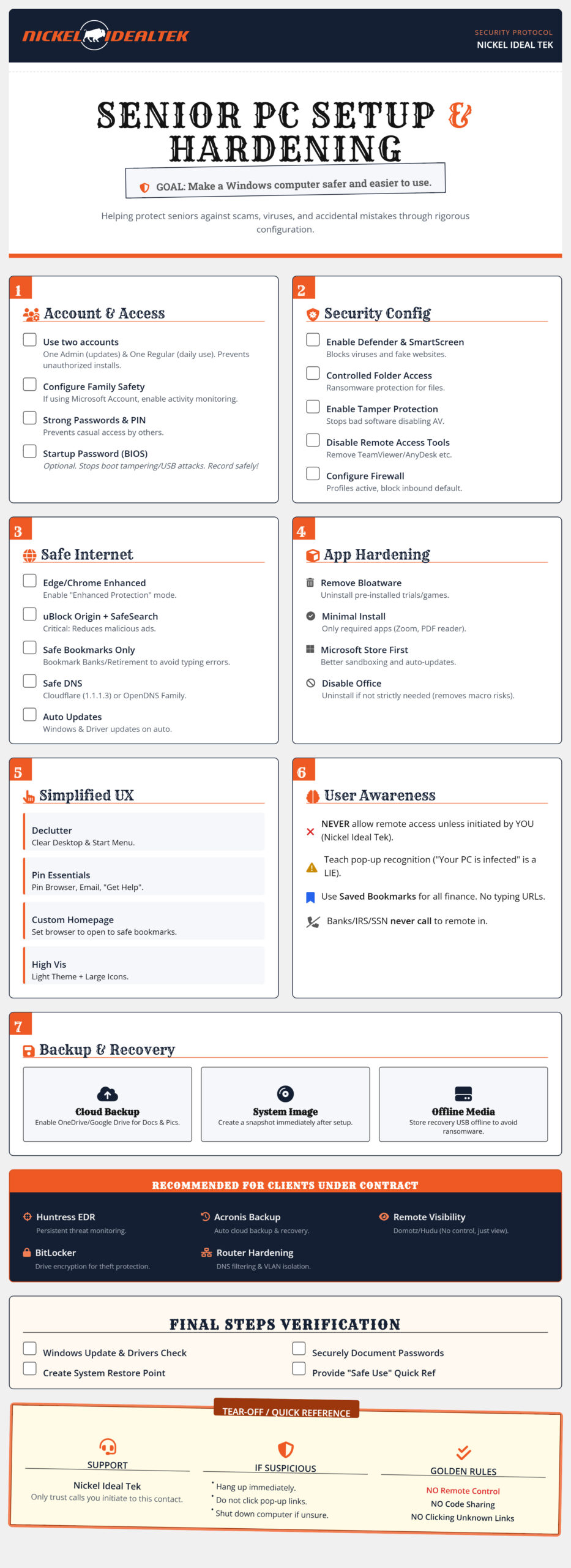
The following technical steps put these principles into practice on the device itself—locking down the system so scam pop-ups, malicious downloads, and accidental remote-access tools cannot take hold.
Critical Implementation Steps
1. The “Two-Account” Rule
Never let a senior (or anyone, really) browse the web as a Local Administrator. We set up one admin account for updates (controlled by you or us) and one standard account for daily use. If a virus tries to install itself, it hits a wall: the password prompt.
2. DNS Filtering is Mandatory
We recommend configuring the network or the PC to use Family Shield DNS (like Cloudflare 1.1.1.3). This acts like a bouncer at the club door—it checks every website request against a database of known malware and adult content. If the site is on the bad list, the page simply doesn’t load.
3. The “No-Typing” Policy
Typosquatting is when hackers buy domains like “goggle.com” or “wellsfarg0.com”. We combat this by setting up a custom homepage filled with visual bookmarks for every site the user needs. They should never have to type a URL into the address bar.
Need help implementing this checklist?
Configuring BIOS passwords, firewalls, and Group Policies can be daunting. Nickel Ideal Tek offers a “Senior Safe Setup” package where we handle the hardening, data migration, and remote monitoring setup for you. Contact Nickel Ideal Tek →