
The “Grandparent Scam” Ends Here:
How to Harden a Senior’s PC Against Attacks
Setting up a computer for a senior parent isn’t just about making the text bigger. It’s about removing the dangerous buttons they shouldn’t click in the first place.
We’ve all heard the horror stories. A pop-up appears on the screen: “Your computer is infected! Call Microsoft Support immediately!” Panic sets in. A phone call is made. And within minutes, a bad actor has remote access to the machine, the bank accounts, and the retirement fund.
At Nickel Ideal Tek, we believe the best defense is a good configuration. We don’t just install antivirus; we “harden” the operating system to make it resistant to mistakes. We strip away the clutter, lock down the critical settings, and create an environment where it is technically difficult to get scammed.
The Strategy: Hardening & Simplification
Our approach relies on two pillars: Security Hardening (locking doors) and Simplification (removing tripping hazards). By using a Standard User account instead of an Administrator account for daily browsing, we prevent 90% of accidental malware installations. By using DNS filtering, we block scam sites before they even load.
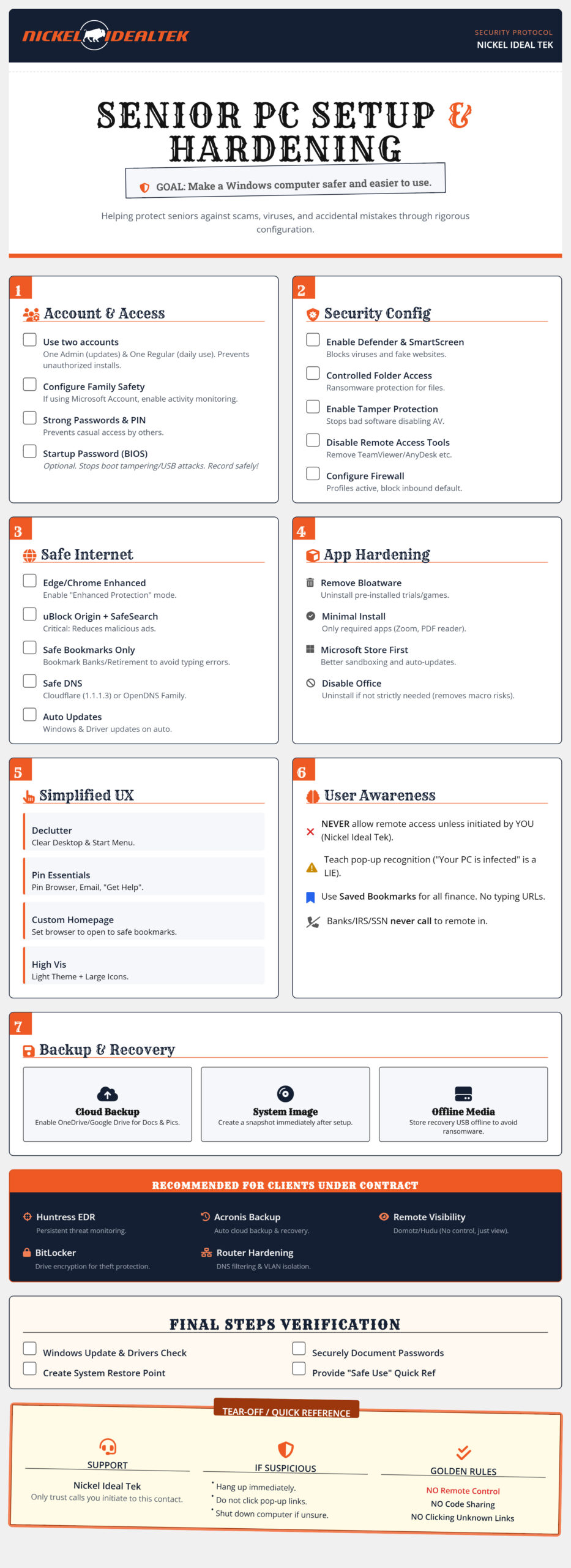
Critical Implementation Steps
1. The “Two-Account” Rule
Never let a senior (or anyone, really) browse the web as a Local Administrator. We set up one admin account for updates (controlled by you or us) and one standard account for daily use. If a virus tries to install itself, it hits a wall: the password prompt.
2. DNS Filtering is Mandatory
We recommend configuring the network or the PC to use Family Shield DNS (like Cloudflare 1.1.1.3). This acts like a bouncer at the club door—it checks every website request against a database of known malware and adult content. If the site is on the bad list, the page simply doesn’t load.
3. The “No-Typing” Policy
Typosquatting is when hackers buy domains like “goggle.com” or “wellsfarg0.com”. We combat this by setting up a custom homepage filled with visual bookmarks for every site the user needs. They should never have to type a URL into the address bar.
Need help implementing this checklist?
Configuring BIOS passwords, firewalls, and Group Policies can be daunting. Nickel Ideal Tek offers a “Senior Safe Setup” package where we handle the hardening, data migration, and remote monitoring setup for you.Contact Nickel Ideal Tek →
